
Claim up. Assess down. The same workflow both ways.
Payment claims, variations, provisional sums, RFIs and instructions run the same way on the head contract and on every subcontract. You submit to the client and assess your subcontractors in one system, and each party sees its own side of the contract.
Head contract and subcontracts. In every plan.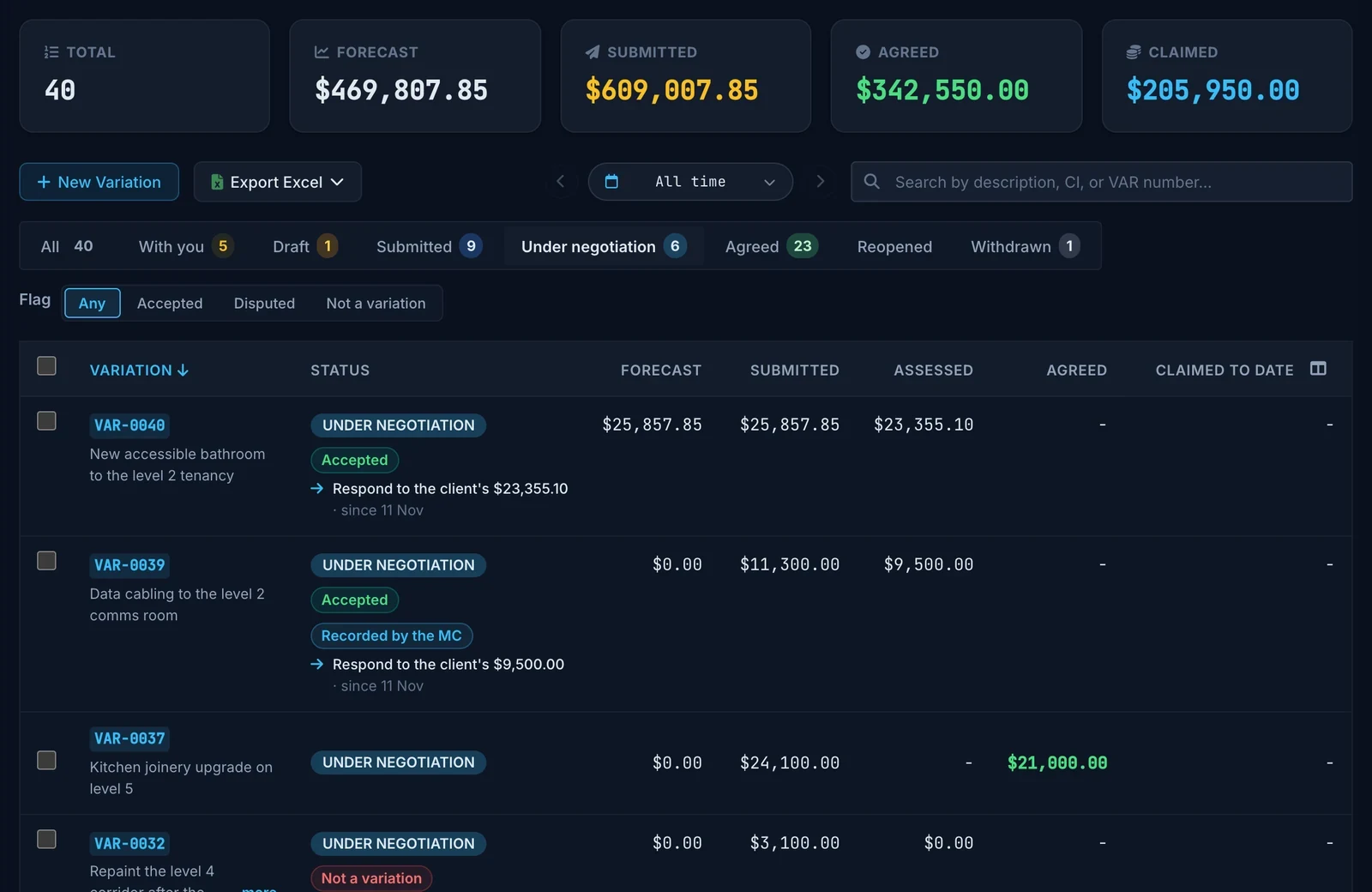
A variation is rarely agreed at the first figure, and some start as a price the client asked for before instructing the work. You submit a price, the client answers with its own, and it can go back and forth for weeks while the work carries on. Truvect records each position, who sent it and why, and shows whose move it is.
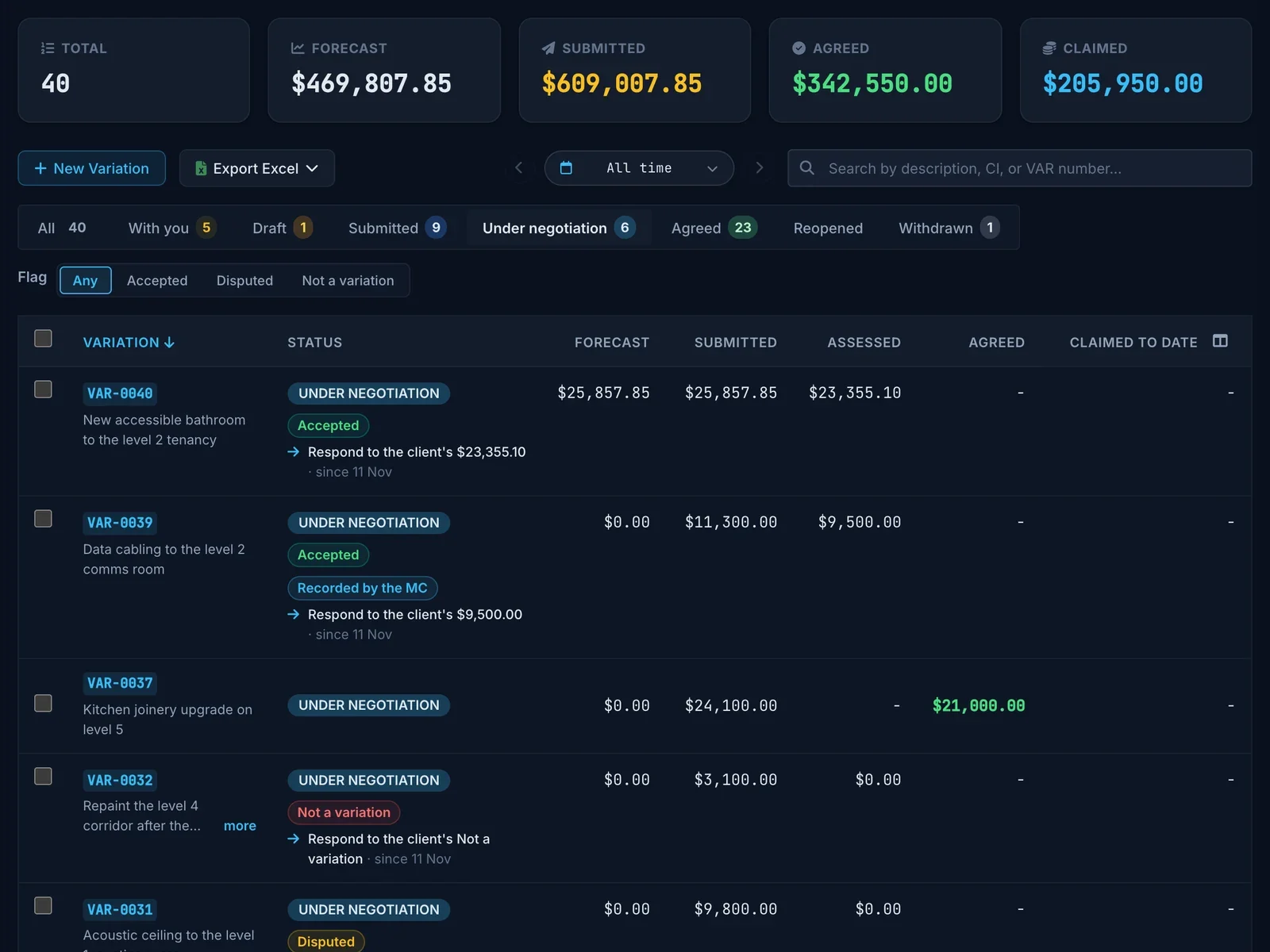
Record what was said outside Truvect.
A figure the client gave in a meeting, by email or on a payment schedule goes in as their position, marked as recorded by you with its source. So does an instruction given by letter or email, and the client is asked to confirm it.
Reopen an agreed figure.
When an agreed variation is challenged later, reopen it. It stays agreed at that figure until the new round closes.
Choose which files the client sees.
Each file on a head contract variation has a Shared with client switch. Turn it off for a subcontractor’s quote or your cost build-up.
Tender the extra work.
An additional package in Pricing is tendered, awarded and issued as a subcontract like any other, and links to the price submittal it prices. It shows your cost, and the sell with the contract’s variation P&G and margin.
See the cost against it.
Each variation lists the supplier invoices coded to it and totals them against its value.
Ask for a second opinion.
With Variation advice turned on, Truvect AI suggests up to three next moves. Only the person who asked sees them, and it sends nothing.
You build the month’s claim and submit it. The client’s QS assesses it line by line and issues the payment schedule from the same claim, so both sides are looking at one set of figures.
Built from the schedule.
The claim pulls in the schedule of values, the variations you are claiming, provisional sums and materials on and off site. Progress entered against the programme shows as a suggested value.
Assessed in Truvect, or read from a PDF.
If the client’s QS issues the schedule outside Truvect, drop in the PDF. Truvect AI reads the figures and checks them against your claim.
Retention in tiers.
Set the tiers and release terms from the contract once. Every claim and certificate works retention out the same way.
Part payments.
Record what the client actually paid. The claim reads Part paid until the balance is in, and the cashflow forecast counts only what is still unpaid.
- DraftYou build the claim
- SubmittedThe client’s QS assesses it
- CertifiedThe payment schedule is issued
- Part paidEach payment received is recorded
- PaidThe balance is in
Every subcontract has its own claims, variations, provisional sums, RFIs and instructions. With the client you are the one submitting. With your subcontractors you are the one assessing, and Truvect links the two.
| Record | Head contract: you and the client | Subcontract: you and each firm | Between the two |
|---|---|---|---|
| Payment claims | You submit. The client’s QS assesses and issues the payment schedule. | They submit, or you import their PDF. You assess and issue the payment schedule. | Sync a subcontract’s schedule into a trade on your head claim. |
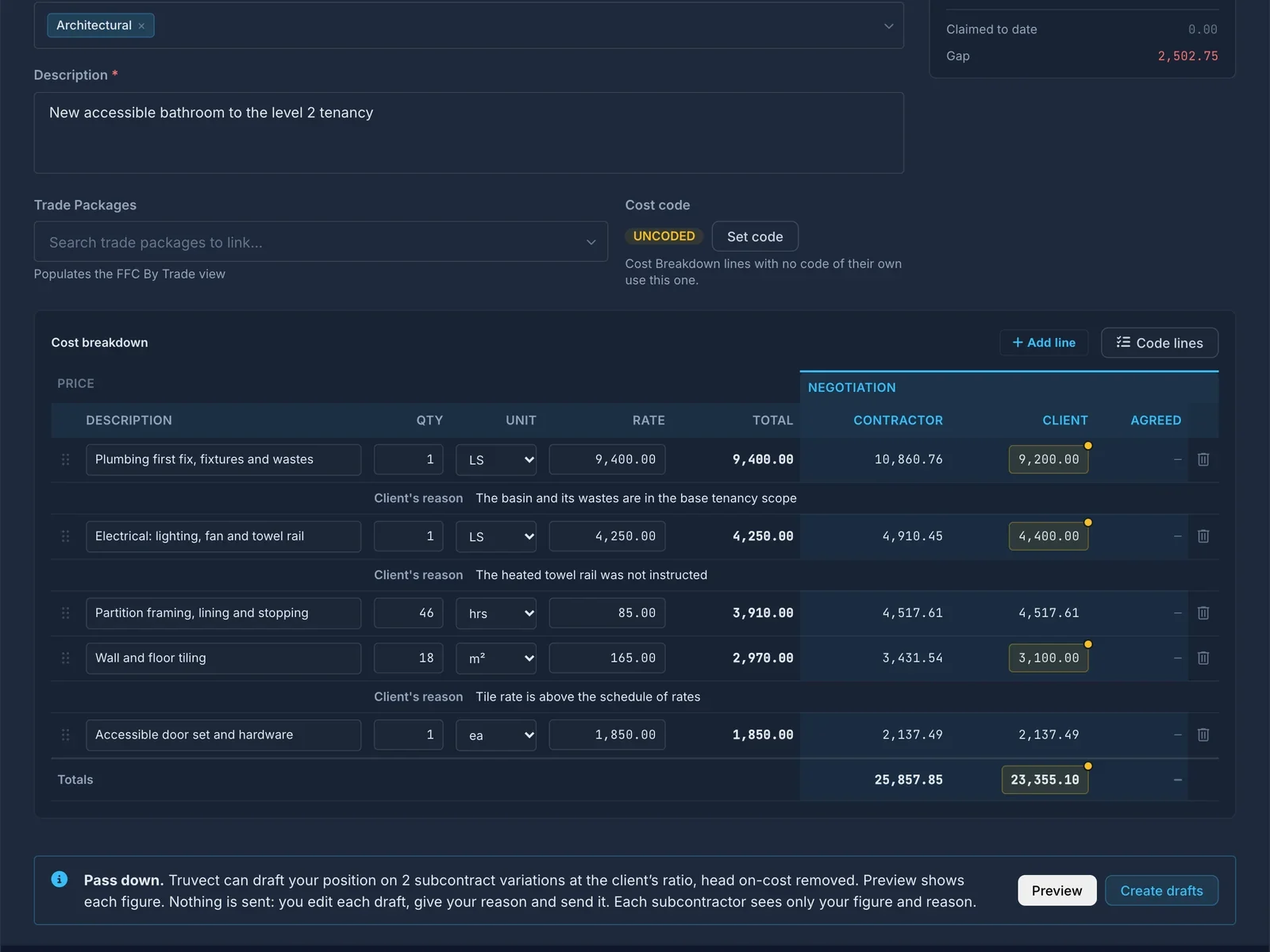
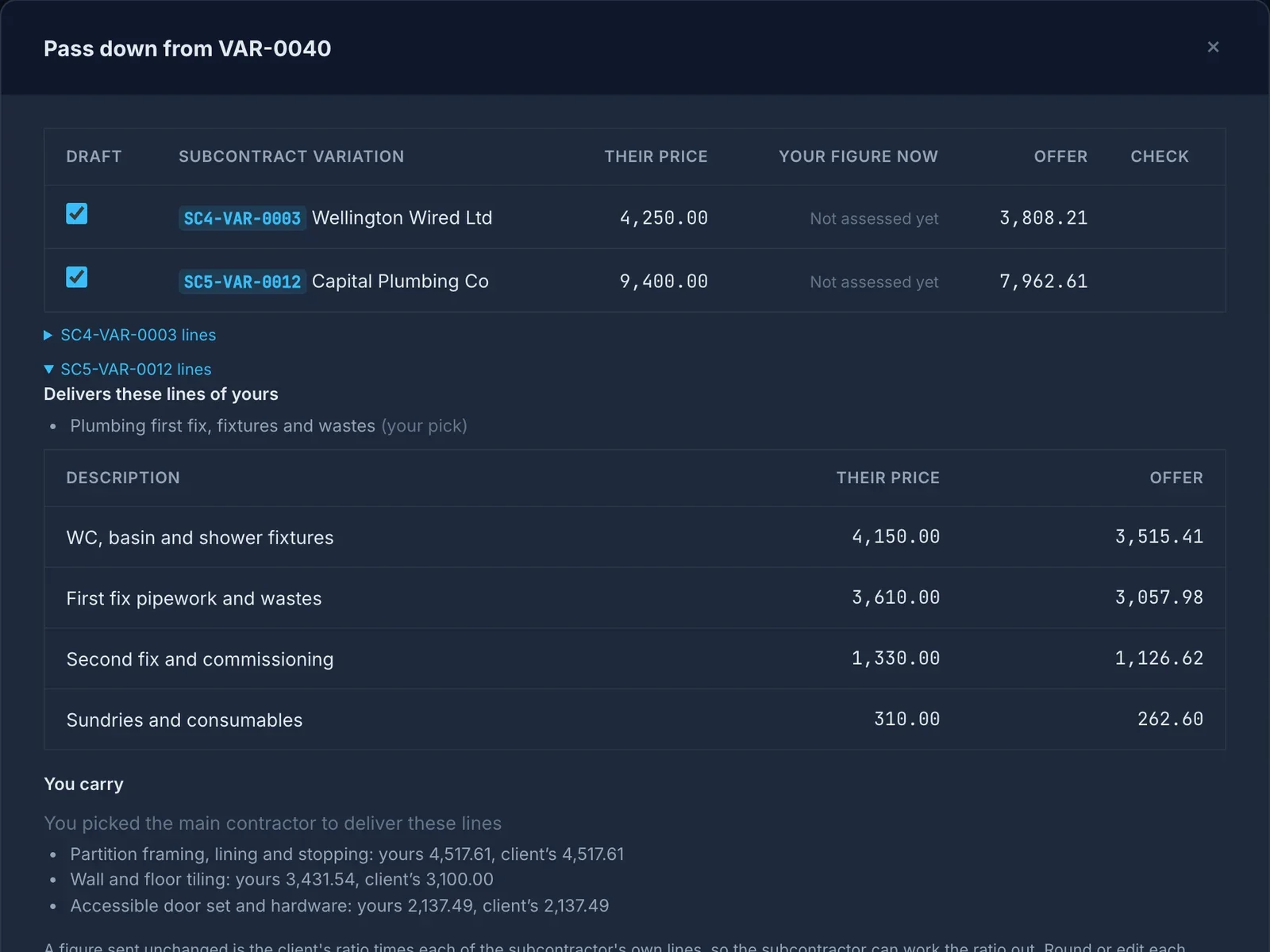
| Variations | You price, before the instruction or after it. The client assesses, round by round. | They price. You assess, round by round. | Pass down drafts your position from the client’s cut. |
| Instructions | The client issues contract instructions. You respond. | You issue subcontract instructions. They respond. | Allocate to Subcontractors drafts one for each firm. |
| RFIs | You raise them. The consultant or the client responds. | They raise them. You respond. | Raise a subcontractor’s RFI to the head contract, files included. |
Claims from a PDF.
A subcontractor who sends a PDF claim costs you no typing. Truvect AI copies the figures as printed, matches each line to the schedule and lists anything it could not read.
Payment schedules on your letterhead.
Numbered within each subcontract, with the subcontractor’s address and a note of when and how the schedule was served.
Each firm sees its own subcontract.
A subcontractor’s people see their own claims, variations and instructions, and your assessment once you send it. They never see the head contract.
An RFI is answered with an instruction. The instruction becomes a variation, the variation goes to the subcontractors who deliver it, and it lands on a claim. Each record links to the one before, so a cost can be followed back to the question that caused it.
Ask the right discipline.
Raise the RFI to the disciplines it affects, set its priority and tick Blocking work if it is holding the job up. The response is tracked against its due date. EOT claims and notices of delay use the same form.
The answer becomes an instruction.
The client creates the instruction from the RFI. It takes the RFI’s subject, disciplines and files, and the RFI moves to Responded. An instruction issued with no due date gets one from the contract’s response period, in working or calendar days.
The instruction becomes a variation.
Create Variation opens a variation with the instruction linked and its Direction Type filled in. When the instruction asks for a price first, Truvect drafts a price submittal, and it becomes the variation once the client instructs it. An instruction that needs no variation is marked No cost.
It goes to the firms that deliver it.
Allocate to Subcontractors drafts a subcontract instruction for each firm. Their variations link back to yours, so what you certify to them reads against what the client agreed to pay.
And it lands on the claim.
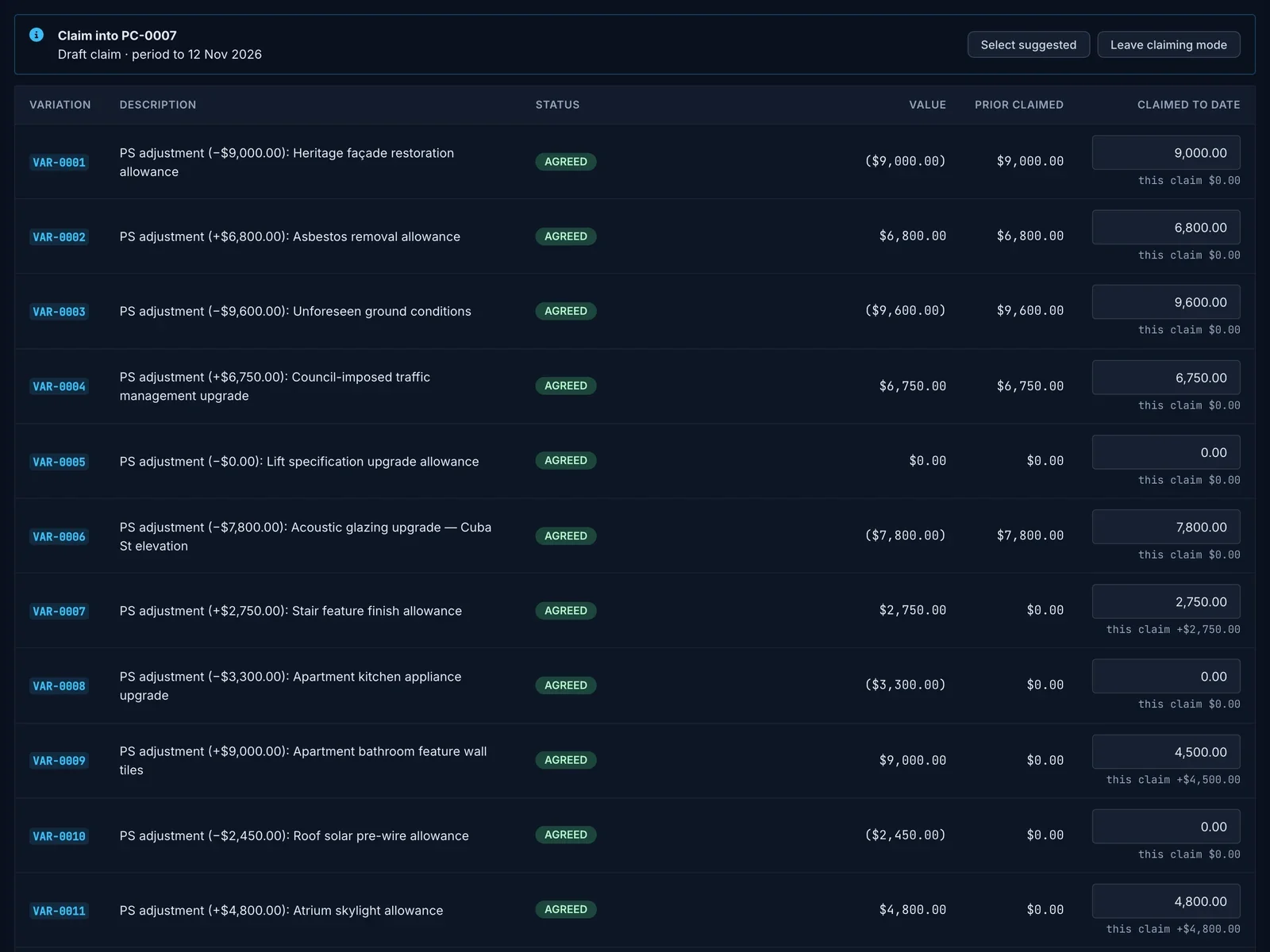
From the Variations register, you claim a variation into the open claim, agreed or not. Truvect lists every variation the claim can take and what each adds this period.
Access follows the contract, not the job title. Your team, the client’s QS, a subcontractor and a consultant can all open the same piece of work, and each sees what their position in the contract entitles them to.
Set by the contract.
Roles map to positions in the contract: main contractor, client, consultant and subcontractor. You can tighten any role on a project.
Enforced on the server.
What a role may not see is removed before the page loads. Truvect AI answers within the same limits.
- Every round, with both sides’ figures and reasons
- Your cost breakdown and on-cost
- Your internal notes
- The subcontract variations that deliver the work
Your project team works across both contracts: the head contract and every subcontract.
- Your submitted price and your reasons
- Their own assessment, line by line
- Agreed and forecast values
- Your cost build-up
- Your internal notes
- Subcontract prices
- Files you have not shared with the client
- Their own price and cost lines
- Your assessment and reasons, once you send them
- What they have claimed against it
- The head contract variation
- The client’s figure
- Other subcontracts
- The RFIs, instructions and variations routed to their discipline
- The amounts and agreed on-cost, unless you limit them in Access Controls
- Your cost build-up
- Items routed to other disciplines
Every move is dated and named.
Each record keeps its history: who submitted, assessed, countered, instructed or reopened it, and when. A figure or an instruction you enter for the client is marked as recorded by you.
Drafts stay private.
An assessment or a counter is yours until you send it. The other side sees it as soon as you do.
Access follows the contract.
A subcontractor sees its own subcontract. The client never sees your cost build-up or your internal notes.
Nothing is sent for you.
Pass down, imports and Truvect AI produce drafts. A person sends every figure.
It runs to your contract.
Each contract carries its own terms: response periods in working or calendar days, and retention. Claims, schedules and instructions are timed against them.
Paper when you need it.
Variations, RFIs, instructions and payment schedules download as PDFs on your letterhead. Registers export to Excel.
Supplier invoices on the variation
Code an invoice to the variation it belongs to, and its cost stays with the change that caused it.
Materials on and off site
Claim material delivered but not yet installed, whether it is on site or in a supplier’s yard.
EOT claims and notices of delay
Raised on the same form as an RFI, so time and questions sit in one register.
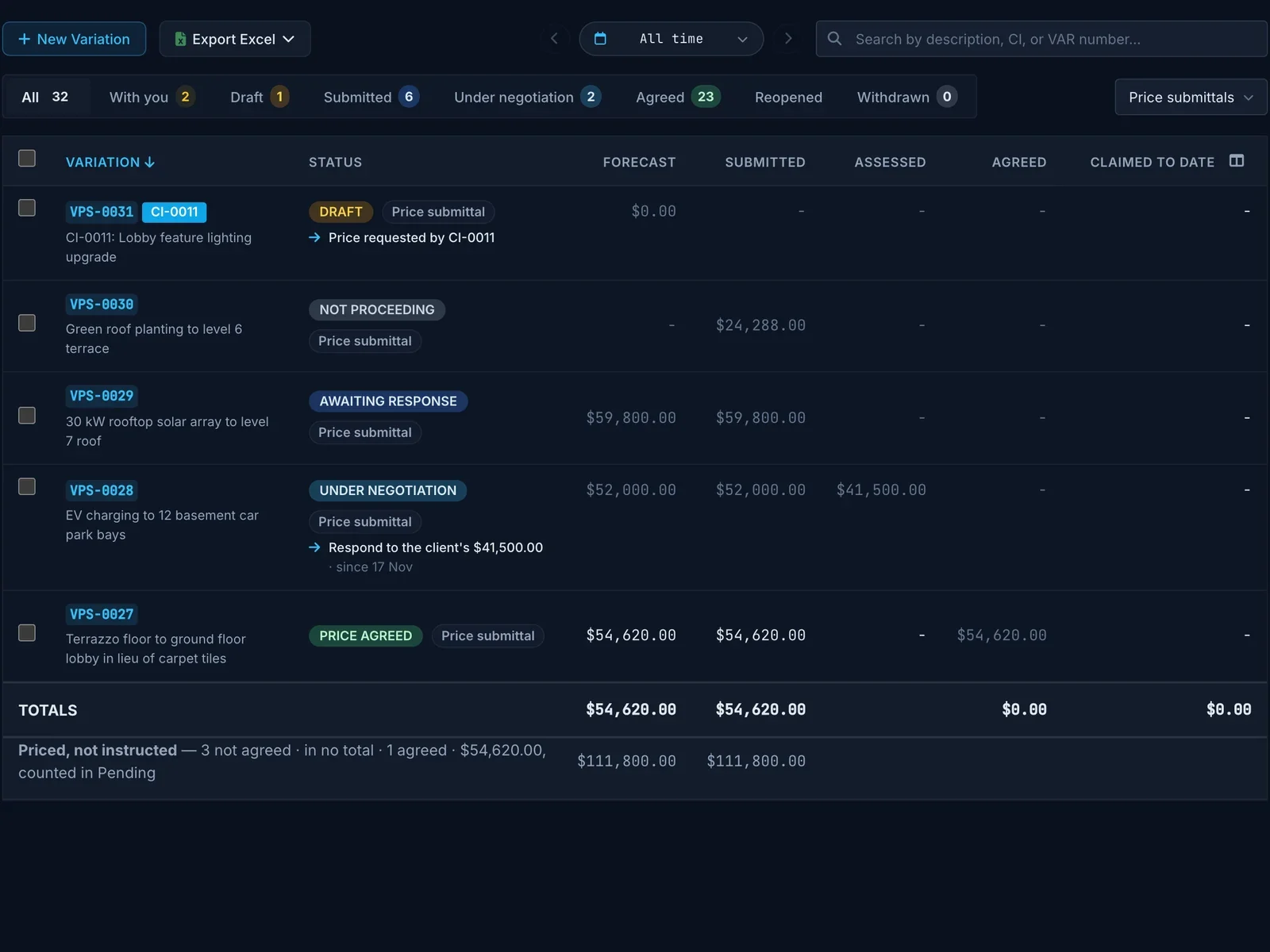
Priced, not yet instructed
Price submittals the client hasn’t instructed get their own row under the register totals.
Amounts with no retention
Enter a deposit the subcontract keeps free of retention, and claims take retention on the rest.
Claims kept up to date
When an earlier claim is certified after you submit, update this one to the latest certified figures and resubmit it in one step.
Truvect AI reads subcontractor claims, checks payment schedules and flags cost in messages. See Truvect AI
See it in action.
Book a 30-minute demo and we'll walk you through Truvect on a project like yours. There's no commitment. It's a chance to see if it's a fit.
What happens next
- Tell us a bit about your company.
- We contact you within one working day to set a time.
- We show you Truvect on a project like yours.
- If it's a fit, we set you up on a free one-month trial and help you load your project data.
This is the most cohesive and complete project and financial management tool I have ever seen.
Request received.
Thanks. We'll contact you within one working day to set a time for your demo.